FREE AI SYSTEM INVENTORY FOR EXCEL
Know what AI exists before you try to govern it.
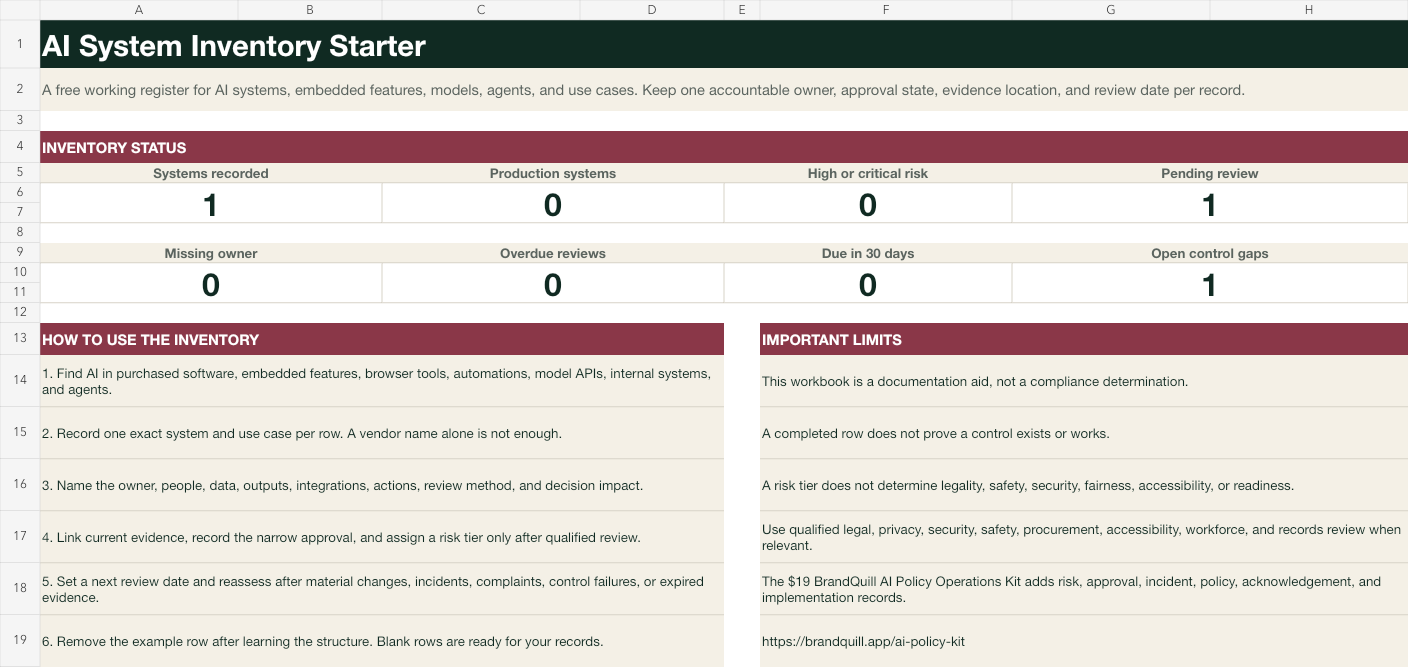
Download a practical XLSX for AI systems, embedded software features, models, agents, automations, and exact use cases. Track owners, people, data, outputs, integrations, actions, approvals, evidence, control gaps, and review dates without a signup or upload.
- Editable XLSX
- 50 working rows
- 28 fields
- No signup
- No upload
- Qualified review required
THE PRACTICAL ANSWER
Inventory the use, not just the vendor.
The same AI provider can support very different workflows, people, data, outputs, actions, and consequences. Record each exact system and use case separately so reviewers can see the real operating boundary, owner, evidence, approval, and review date. The NIST AI RMF Playbook describes an AI system inventory as an organized database of artifacts that supports both system-level questions and an organization-wide view.
WHAT THE TEMPLATE CAPTURES
The fields that turn a software list into a reviewable operating record.
Exact system and purpose
Name the product, model, configuration, lifecycle, deployment, business purpose, and one exact workflow instead of recording only a vendor.
Accountable ownership
Record the business owner, operating team, authorized users, affected people, and the qualified human review required before decisions or actions.
Data and outputs
Describe input categories, sensitivity, provenance, outputs, destinations, retention, recipients, and downstream use.
Integrations and actions
Identify connected repositories, APIs, identities, scopes, tools, external systems, autonomous steps, approval gates, logs, and rollback.
Decision and control state
Record decision impact, current organizational risk tier, narrow approval status, open control gaps, restrictions, and evidence location.
Review lifecycle
Track the last and next review dates. Formulas identify missing, overdue, due-soon, and current records while leaving the decision to accountable reviewers.
A WORKABLE PROCESS
Build a useful inventory in four passes.
- 1
Discover the actual use
Look across purchased tools, embedded features, browser extensions, model APIs, automations, agents, internal systems, experiments, and unsanctioned workflows.
- 2
Separate systems and use cases
Create a distinct row when the product, configuration, data, people, workflow, integration, action, purpose, or decision impact differs.
- 3
Collect evidence and record the decision
Link current contracts, settings, data flows, tests, logs, approvals, restrictions, owners, open gaps, and qualified-review conclusions.
- 4
Review changes, not just dates
Reassess after incidents, complaints, drift, model or vendor changes, new data, expanded scope, new integrations, automated actions, control failures, or expired evidence.
COMMON FAILURE MODES
A long software list can still hide the important decisions.
- Recording one vendor row even when several products, configurations, workflows, data types, user groups, and decision impacts need different reviews.
- Excluding embedded AI features, browser tools, plug-ins, model gateways, automations, agents, experiments, and employee-adopted tools.
- Leaving ownership, affected people, data flows, integrations, automated actions, approvals, control gaps, and evidence locations blank.
- Assigning a risk tier without a documented method, current evidence, qualified review, uncertainty, conditions, or decision authority.
- Reviewing on a calendar while ignoring incidents, complaints, drift, scope changes, new data, new actions, vendor changes, and expired controls.
THE COMPLETE OPERATING SET
Connect inventory to risk, approvals, incidents, and policy.
The $19 BrandQuill AI Policy Operations Kit adds a larger coordinated Excel workbook with inventory, 30 starter risks, an approval log, incident log, dashboard, and scoring guide. It also includes five editable Word files, a PDF implementation guide, and lifetime BrandQuill Solo access.
$19 once
No subscription. Seven-day fit guarantee.See the complete kit →Download the free risk register →COMMON QUESTIONS
Start with visibility and keep every conclusion reviewable.
What is an AI system inventory?
It is an organized record of the AI systems, embedded features, models, agents, automations, and exact use cases an organization operates or is considering. A useful inventory also tracks ownership, people, data, integrations, actions, approval, evidence, and review dates.
What is included in the free Excel template?
The XLSX includes a formula-driven dashboard, 50 inventory rows, one clearly labeled example, 28 fields, data validation, review-status formulas, conditional formatting, a field guide, source links, and usage limitations.
Does BrandQuill upload the inventory or require an account?
No. The workbook is a direct download. You can edit it locally in Excel or another compatible spreadsheet application without creating an account or uploading inventory data to BrandQuill.
Should one row represent a vendor or a use case?
Use one row for one exact system and use case. The same vendor may appear in several rows when different products, configurations, data, people, workflows, integrations, actions, or decision impacts require separate review.
Does completing the inventory make an organization compliant?
No. The template provides a record structure, not legal, safety, security, fairness, accessibility, procurement, workforce, records, or compliance conclusions. Qualified review and authorized decisions remain necessary.
What does the paid kit add?
The $19 AI Policy Operations Kit connects inventory to a larger risk register, approval log, incident log, dashboard, scoring guide, five editable Word files, a PDF implementation guide, and lifetime BrandQuill publishing.