FREE AI RISK REGISTER FOR EXCEL
Turn AI risk into an owned operating record.
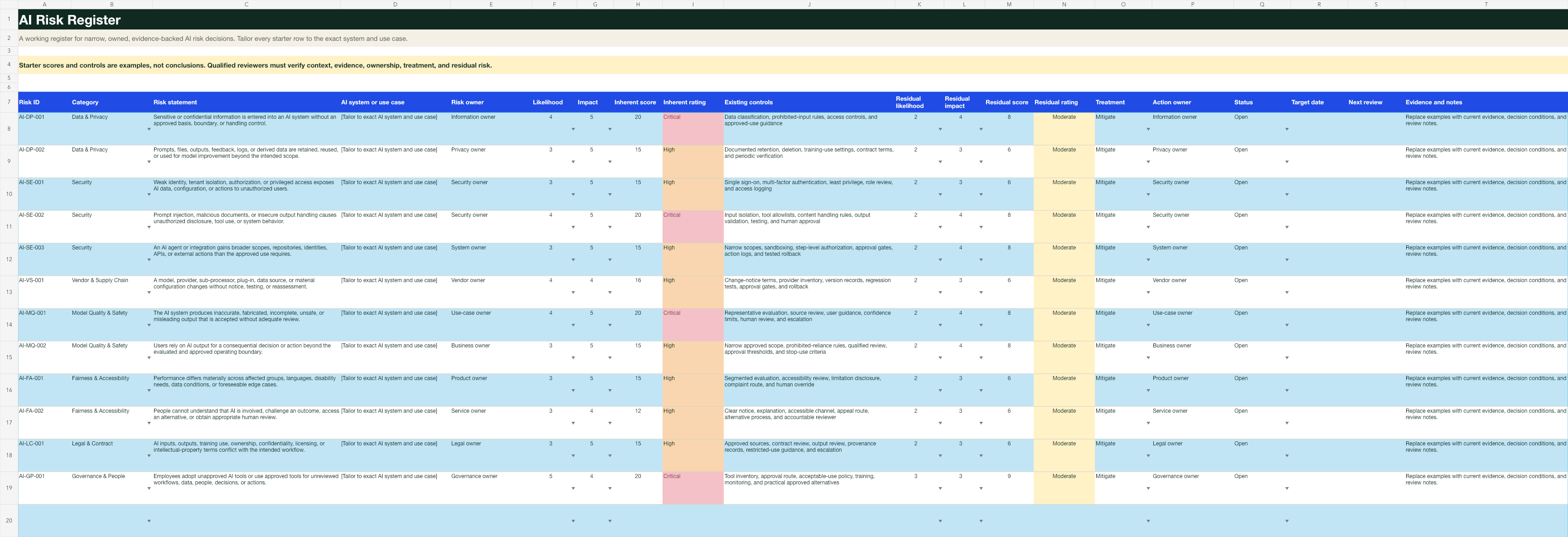
Download a practical XLSX with 12 starter risks, formula-driven inherent and residual scoring, shared rating definitions, controls, action owners, target dates, and review dates. No signup and no upload.
- Editable XLSX
- 12 starter risks
- No signup
- No upload
- Qualified review required
THE PRACTICAL ANSWER
Score less. Decide better.
A useful risk register does not hide behind one color or number. It records the exact system and use case, the risk event, current evidence, inherent exposure, verified controls, residual exposure, treatment, owner, due date, and next review. The free template supplies a consistent structure while leaving every conclusion to qualified reviewers and authorized decision owners.
WHAT THE TEMPLATE CAPTURES
The fields needed to keep risk narrow, owned, and reviewable.
Exact scope
Name the AI system, model supply chain, configuration, data, users, affected people, workflow, decisions, integrations, actions, and locations.
Risk event
Describe the plausible event and consequence instead of relying on a broad label such as privacy, bias, security, or hallucination.
Inherent exposure
Record likelihood and impact before controls, with a shared five-point guide and an automatically calculated score and rating.
Controls and evidence
Identify the current control, the evidence that it exists and works, the owner, the operating conditions, and unresolved uncertainty.
Residual exposure
Score the remaining likelihood and impact after verified controls. The formula produces a consistent rating without deciding what is acceptable.
Treatment and review
Assign treatment, action owner, status, target date, evidence notes, next review, and the qualified or authorized decision route.
A WORKABLE PROCESS
Use the register in four passes.
- 1
Scope the exact system and use case
Replace the example text with the real product, plan, configuration, data, people, workflow, outputs, decisions, actions, integrations, and lifecycle stage.
- 2
Tailor the starter risks
Remove prompts that do not apply. Add plausible risk events supported by qualified review, current evidence, incident history, testing, complaints, and uncertainty.
- 3
Verify controls before residual scoring
Record who operates each control, what evidence proves it is current, where it fails, and which conditions or boundaries must remain true.
- 4
Assign treatment and an authorized decision
Name the owner, action, target date, status, next review, restriction, escalation, acceptance criteria, and decision authority.
COMMON FAILURE MODES
A colorful spreadsheet can still hide the real risk.
- Copying a generic risk list without tailoring it to the exact system, configuration, data, people, workflow, decisions, integrations, and operating conditions.
- Treating starter risks as findings or assuming every listed control exists and works.
- Scoring residual risk before verifying current controls, evidence, ownership, failure conditions, and monitoring.
- Using a score as the approval decision without qualified review, restrictions, acceptance criteria, or an authorized decision owner.
- Leaving actions, target dates, review dates, change triggers, incidents, and evidence gaps unowned.
THE COMPLETE OPERATING SET
Connect the risk register to inventory, approvals, incidents, and policy.
The $19 BrandQuill AI Policy Operations Kit adds a coordinated Excel governance workbook with an AI inventory, 30 starter risks, approval log, incident log, dashboard, and scoring guide. It also includes five editable Word files, a PDF implementation guide, and lifetime BrandQuill Solo access.
$19 once
No subscription. Seven-day fit guarantee.See the complete kit →Generate a free use-case assessment →COMMON QUESTIONS
Use the template for structure, not certainty.
What is included in the free AI risk register?
The XLSX includes a start-here sheet, 12 editable starter risks, 30 working rows, formula-driven inherent and residual scores, rating bands, data validation, owners, treatments, target dates, review dates, and a shared scoring guide.
Does BrandQuill upload the spreadsheet or require an account?
No. The template is a direct download. You can open and edit it locally in Microsoft Excel or another compatible spreadsheet application without creating an account.
Are the starter risks findings about my organization?
No. They are prompts for qualified review. Remove what does not apply, add risks supported by the exact system and use case, verify controls and evidence, and record an authorized decision.
Does the score determine whether an AI system is safe or compliant?
No. A spreadsheet score cannot determine safety, legality, security, fairness, accessibility, or compliance. Use the register to make uncertainty, evidence, ownership, treatment, and decisions reviewable.
What does the paid kit add?
The $19 AI Policy Operations Kit includes a larger coordinated Excel workbook with an AI inventory, 30 starter risks, approval log, incident log, dashboard, and scoring guide. It also includes five editable Word files, a PDF implementation guide, and lifetime BrandQuill publishing.